Intuitive introduction to MCP
Notes on Model Context Protocol and Tool calling
MCP is getting popular again since the recent 2026-07-28 specification introduced the stateless protocol layer. This makes it easier to deploy MCP servers on scalable infrastructure, including serverless and edge infrastructure.
So I figured I’d write an intro to MCP explaining:
- Prerequisites : tool calling
- Need for MCP
- What is MCP?
- Well-known MCP servers and use cases
- How to build MCP servers and support MCP in AI apps?
- References/Sources
Prerequisites
(feel free to skip this section if you already know about tool calling)
Before we dive into MCP, it’s important to know about tool calling (also called function calling).
Large Language Models (LLMs) reason and output in text (well, some models have multi-modal capabilities to produce images, video & audio). Think of it this way, imagine you have a “magical” pen, you use it to write your query on a paper. The pen responds by writing the response.
You could ask it questions such as “When did the first Avatar movie release?” and it would probably write “December 18, 2009” on the paper. Pretty fun, isn’t it? But what if you ask it something like “check the flight prices from Delhi to London monday next week”? It can’t know the answer unless it somehow has a means to access the internet to check a flight ticketing website.
Maybe the example got a bit far but I hope you get the idea.
Since the models themselves do not have access to computer systems, we need to build a system around it to augment its capabilities. The LLM ouputs a structured action request, the system parses & executes the action programmatically and returns the result back to the LLM. The model can now use this info to answer our query or request another action.
The system is often called a harness and the structured action request is called a tool call.
Let’s go back to the example above about flight prices. The harness will provide information about the available tools to the model.
Let’s assume the harness has a tool to access the internet (call it web_search). Then the model can ask to use this tool to access the information on the internet. The model will output the tool call in a structured format with tool name + arguments.
Conceptually as an example, the structured request might look something like this:
<tool_call>
{"arguments": {"search_query": "DEL to LHR flight prices 17 Aug 2026"}, "name": "web_search"}
</tool_call>
The model provider usually parses this request and sends the tool call info via the API. The harness receives the tool call request, executes (handles) the tool call and provides the result back to the model.
So it’s the harness’s job to:
- specify which tools are available to the model
- implement the execution of tools and provide the model with the tool call result.
If you are building an AI application, you can decide which tools are needed and build them.
For coding agents, widely used tools are read_file, edit_file, write_file, bash, web_search.
2. Need for MCP
Suppose you are building a personal AI assistant, and you want it to be able to order food for you online. We, humans, can do that by opening the app and placing an order. If the food delivery aggregator service has an API which allows discovery of items and placing an order, we can use this API to write tools ourselves, which the model can request.
The problem with this approach is:
- Everyone building personal AI assistants have to build their own implementations of these tools.
- If we want to add support for a different food delivery service, we’d have to write a different implementation.
This leads to redundant (and duplicate) work for everyone. For M number of AI applications and N number of services (or tools), if every AI app has to support every service, this leads to MxN integrations.
3. What is MCP?
MCP (Model Context Protocol) is a standardized protocol for connecting AI applications to servers that expose capabilities such as tools, resources, prompts.
Tools are actions that models can invoke. Resources are data sources that provide contextual information (e.g: file contents, database schema). Prompts are reusable templates that help structure interactions with models (e.g: system prompt, few-shot examples).
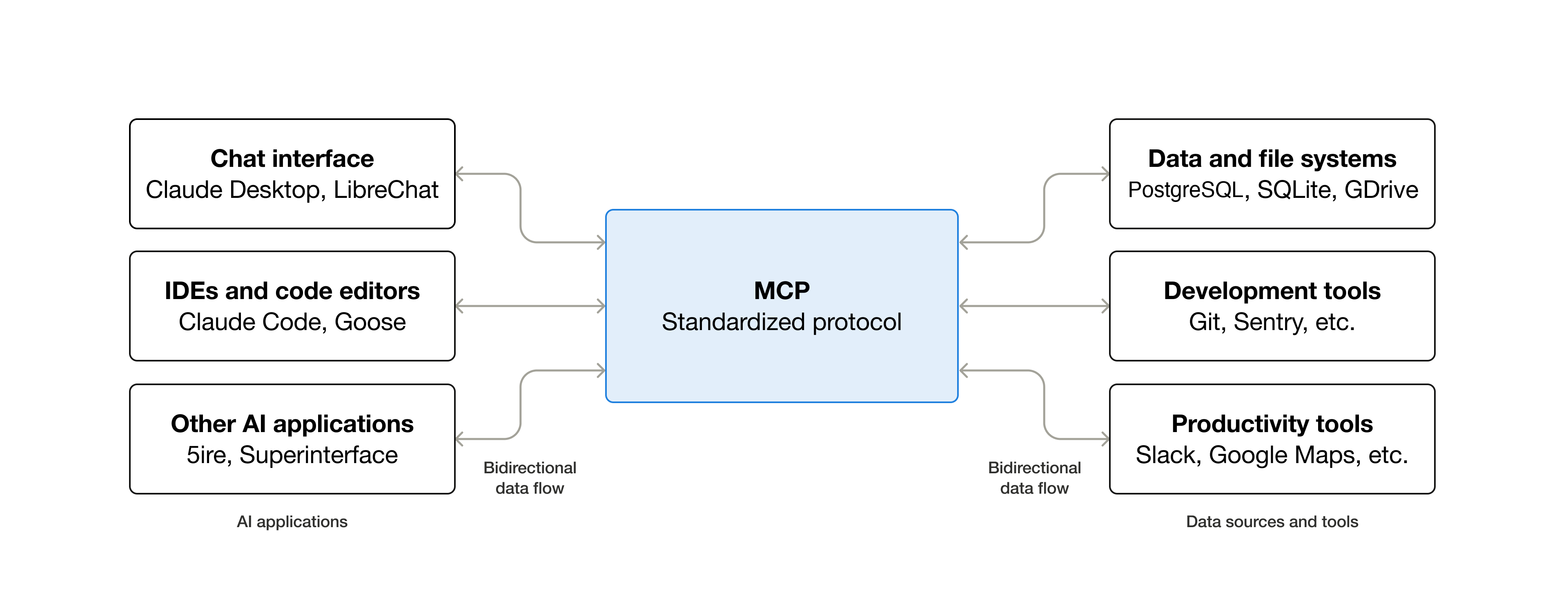
For the example we discussed in the previous section: With MCP, each food delivery aggregator builds their own MCP server allowing access to various tools for their service (along with resources and prompts if needed). Each AI application just has to implement support for MCP, this allows it to connect to different MCP servers to access different services.
So for M number of AI applications and N number of services, with MCP it could be M+N integrations (instead of MxN). Each application implements MCP once, each service implements MCP once.

The inspiration for MCP comes from Language Server Protocol (LSP) which allowed IDEs (code editors) to easily support different programming languages.
In MCP terminology,
- MCP Hosts are AI applications that manage one or more MCP Clients.
- Each MCP Client maintains a connection with exactly one MCP Server. Clients and servers have a 1:1 relationship. If MCP hosts has to connect with 4 MCP Servers then it has to initialize 4 MCP clients for each of the servers.
- MCP Server is a program that provides context to the MCP clients.
4. Well-known MCP servers and use cases
While the public data for MCP server usage is limited, here are some well known MCP servers:
- Context7 MCP provides up-to-date version specific documentation and code examples to your coding agents.
- Playwright MCP provides browser automation capabilities
- Puppeteer MCP
- Figma MCP
- Github MCP
- Chrome Dev Tools MCP
- Google Drive MCP
Not all MCP servers are public, some are made for internal use within an organisation and some for private local use.
5. How to build MCP servers and support MCP in AI apps?
There are official SDKs for building MCP servers and clients in several programming languages including Typescript, Python, C# & Go. The official docs for each of the SDKs are really good. Here’s a first steps guide to using the python SDK.
6. References and Sources
Tool calling structure example: Hugging Face Docs MCP deepdive: Pragmatic Engineer Getting started with MCP: Github repo What is MCP? :MCP documentation